If you are building an AC dimmer with a TRIAC, you have probably noticed flickering, unstable brightness, or random jumps in light intensity.
Most DIY developers think the problem is caused by:
- low-quality dimmer hardware
- bad TRIAC or optocoupler
- PCB layout issues
But in most real-world projects, the dimmer hardware is not the problem.
The real issue is timing accuracy in firmware, especially on ESP8266 and ESP32.
This guide explains:
- why TRIAC dimmers flicker
- why ESP32 makes it harder
- how to fix flicker using software
- why dedicated hardware control is the most reliable solution
How an AC TRIAC Dimmer Works
A TRIAC dimmer does not reduce voltage smoothly.
It controls when the TRIAC turns on during each AC half-cycle.
Process:
- AC waveform crosses zero (zero-cross event)
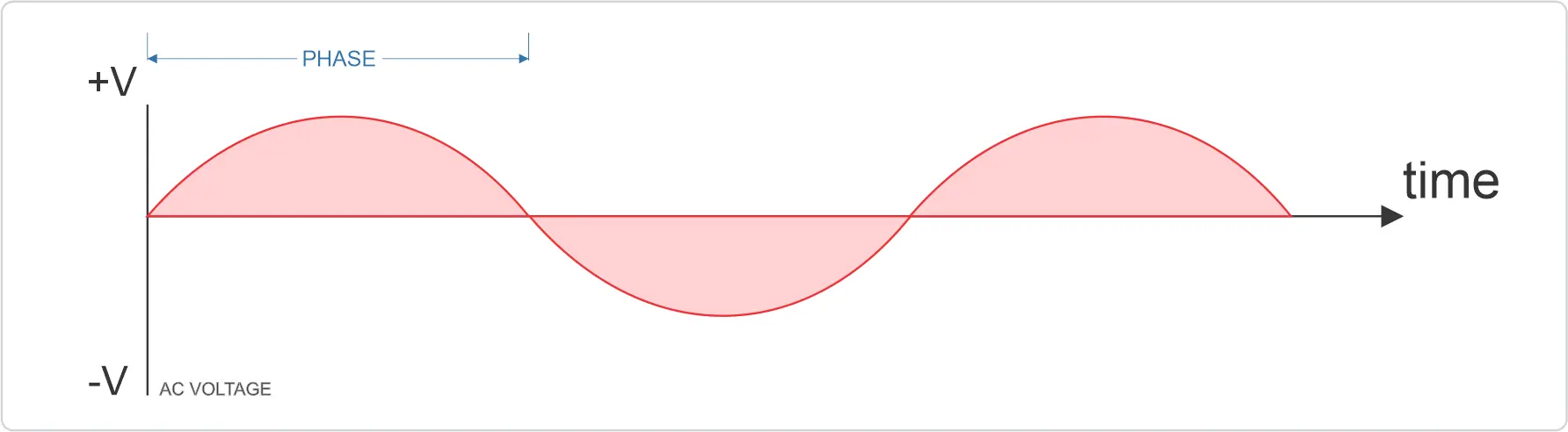
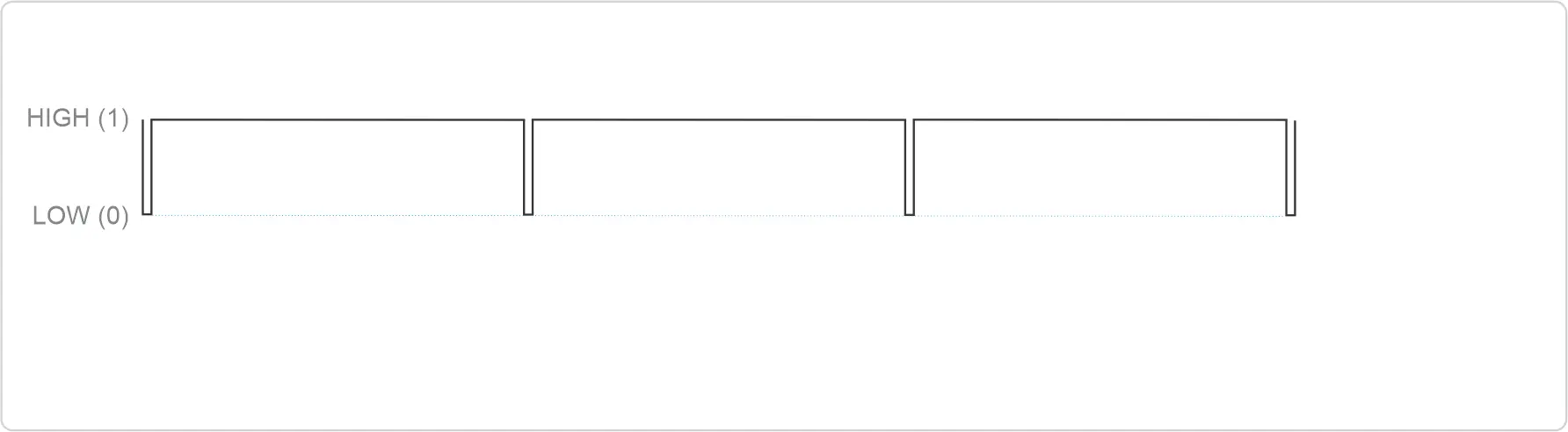
2. MCU waits for a precise delay (phase angle)
3. MCU sends a short gate pulse to the TRIAC
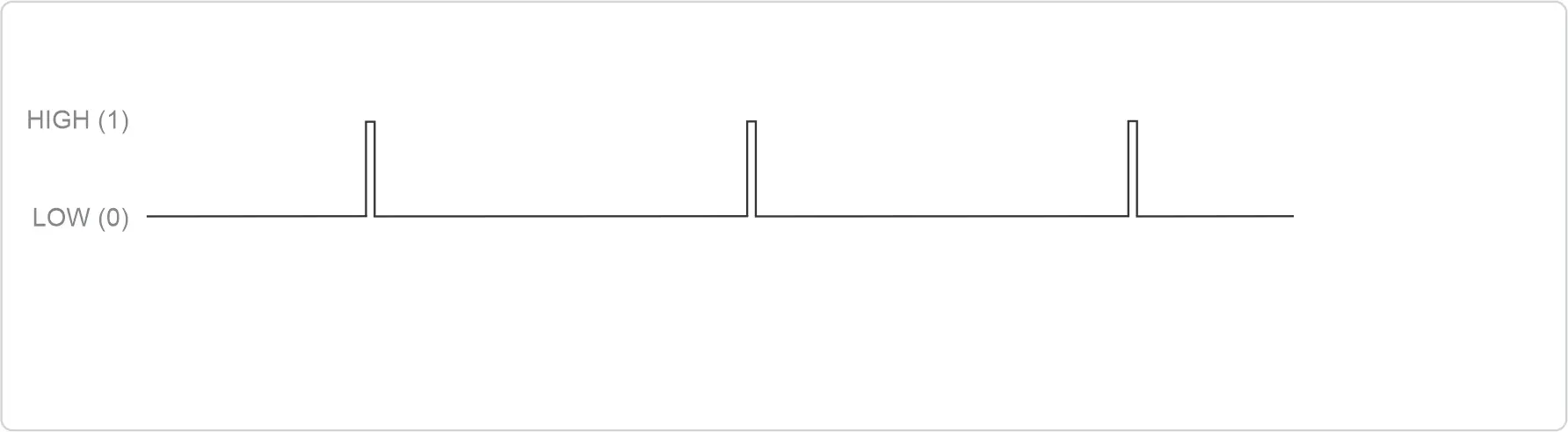
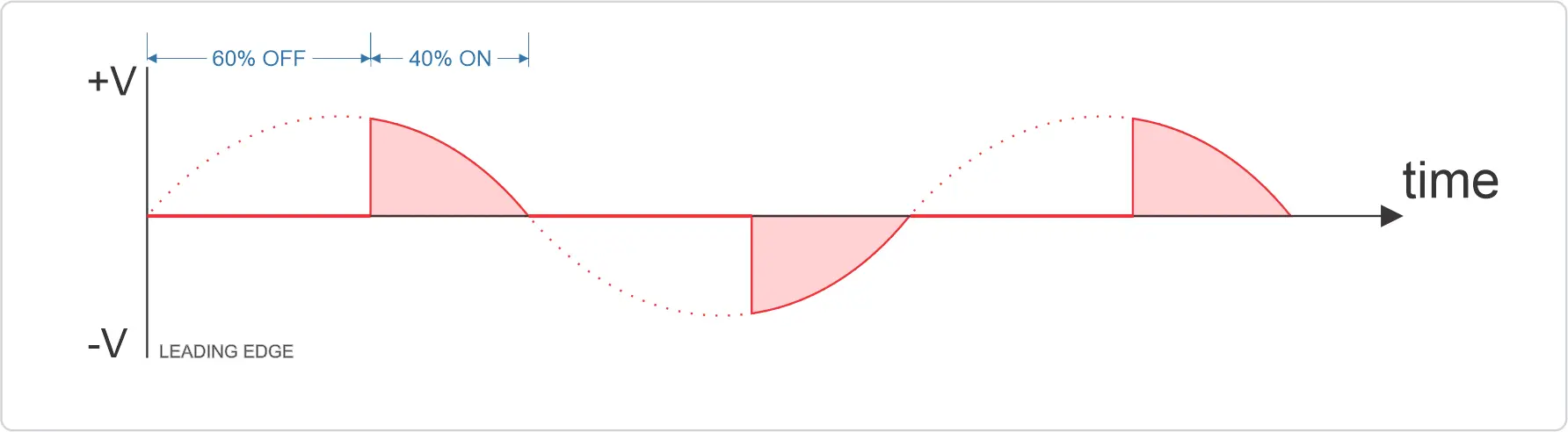
4. TRIAC conducts until the next zero-cross
Brightness depends entirely on microsecond-level timing accuracy.
For a deep technical explanation, read: https://www.rbdimmer.com/blog/diy-insights-1/ac-dimmer-based-on-zero-cross-detector-and-triac-operating-principles-and-applications-5
Why Timing Matters (By The Numbers)
AC dimming is real-time control. Here are the hard numbers:
- AC frequency: 50 Hz(60Hz) → zero-cross every 10 ms
- TRIAC firing accuracy required: ±50 µs for stable brightness
- ESP32 Wi-Fi interrupt blocking: 200–500 µs
- Result: visible flicker even under moderate CPU load
💡 This means Wi-Fi can break TRIAC timing by 10× the acceptable error margin.
Why Flickering Happens in ESP8266 / ESP32 Projects
ESP chips are powerful but not real-time by default.
They run:
- Wi-Fi / BLE stacks
- Flash memory access (often blocking)
- RTOS scheduling (ESP32)
- Background system tasks
If dimmer timing code competes with these tasks:
- zero-cross interrupts get delayed
- TRIAC gate pulses shift
- brightness becomes unstable
This becomes worse when:
- MQTT / OTA / Web UI is active
- logging is enabled
- multiple dimmer channels are used
Common Beginner Mistakes
Popular Arduino / ESPHome / Tasmota examples often:
- use delay() after zero-cross
- run timing logic in non-deterministic callbacks
- call blocking functions inside ISR
- access Flash memory during timing-critical code
They work in demos, but fail in real products.
Solution 1 — Software-Based: rbdimmerESP32.h
For ESP32 dual-core chips, flicker can be solved in software if done correctly.
What rbdimmerESP32.h Does
rbdimmerESP32.h is designed for deterministic TRIAC control:
- hardware timers (not software delays)
- ISR code stored in IRAM (no flash stalls)
- core separation: real-time vs Wi-Fi
- FreeRTOS-safe architecture
Repo: 👉 https://github.com/robotdyn-dimmer/rbdimmerESP32
Key Technical Details IRAM (Instruction RAM)
ESP32 normally executes code from Flash.
Flash access can stall the CPU for hundreds of microseconds.
Solution:
Place timing-critical code in IRAM using:
IRAM_ATTR void zeroCrossISR() {
  // ultra-fast ISR code
}
Hardware Timers
Never use delay() or millis() for TRIAC timing.
Use ESP32 hardware timers for microsecond precision.
Dual-Core Strategy
- Core 0: dimmer timing (real-time)
- Core 1: Wi-Fi, MQTT, UI, logging
This isolation prevents flicker.
When Software Solution Makes Sense
✅ ESP32 only
✅ You understand interrupts and RTOS
✅ You need full firmware control
⚠️ Requires careful architecture
DO ✅
- Use ESP32 hardware timers for TRIAC control
- Keep ISR code under 10 µs
- Run dimming on Core 0, Wi-Fi on Core 1
- Store timing-critical code in IRAM
DON'T ❌
- Never call Serial.print() from ISR
- Don’t access Flash in timing-critical code
- Avoid delay() near zero-cross logic
- Don’t mix dimming and networking tasks
Solution 2 — Hardware-Based: DimmerLink (Recommended)
The most reliable way to eliminate flicker is to remove TRIAC timing from the main MCU.
What Is DimmerLink?
DimmerLink is a dedicated dimmer controller module:
- detects zero-cross
- generates TRIAC pulses internally
- guarantees stable timing
- communicates via UART / I²C
Docs: 👉 https://github.com/robotdyn-dimmer/DimmerLink
Why DimmerLink Eliminates Flicker
- Wi-Fi cannot delay TRIAC firing
- MCU timing bugs cannot affect dimming
- Flash stalls are irrelevant
- Scaling to multiple channels is trivial
Your MCU just sends Serial (UART) commands like:
Example: 02 53 00 32  → Set dimmer 0 to 50%
Response: 00          → OK
| LEVEL | Brightness |
| 0x00 (0) | 0% — off |
| 0x32 (50) | 50% |
| 0x64 (100) | 100% — full brightness |
Software vs Hardware Comparison
| Criteria | rbdimmerESP32.h | DimmerLink |
| Cost (BOM) | $0 | $1.5 |
| Power consumption | Same as MCU | +10 mA |
| PCB space | 0 (software) | ~1×2 cm |
| Certification (CE/UL) | DIY only | DIY only |
| ESP8266 support | ❌ | ✔️ |
| ESP32 support | ✔️ | ✔️ |
RaspberryPI/OrangePI.. | ❌ | ✔️ |
| Multiple dimmers | ⚠️ complex | ✔️ easy |
| Beginner-friendly | ❌ | ✔️ |
| Production ready | ⚠️ | ✔️ |
Decision Tree: Which Solution Is Right for Me?
Are you using ESP8266?
- Use DimmerLink
Are you using ESP32 and want full control?
- Use rbdimmerESP32
Do you need multiple dimmers and rock-solid stability?
- Use DimmerLink
Are you building a commercial product?
- Use DimmerLink
Are you experimenting and learning real-time programming?
- Use rbdimmerESP32
Final Thoughts
TRIAC dimming is not about voltage — it is about microsecond timing.
Wi-Fi is not real-time.
Delays are dangerous.
Flash is unpredictable.
If you want stable light and zero flicker, isolate timing or move it to dedicated hardware - DimmerLink.