Contents | Next: Quick Start →
DimmerLink — User Documentation
AC dimmer controller for lamp brightness control via TRIAC. Connects to your project (Arduino, ESP32, Raspberry Pi, etc.) and allows you to control AC dimmers with simple commands.
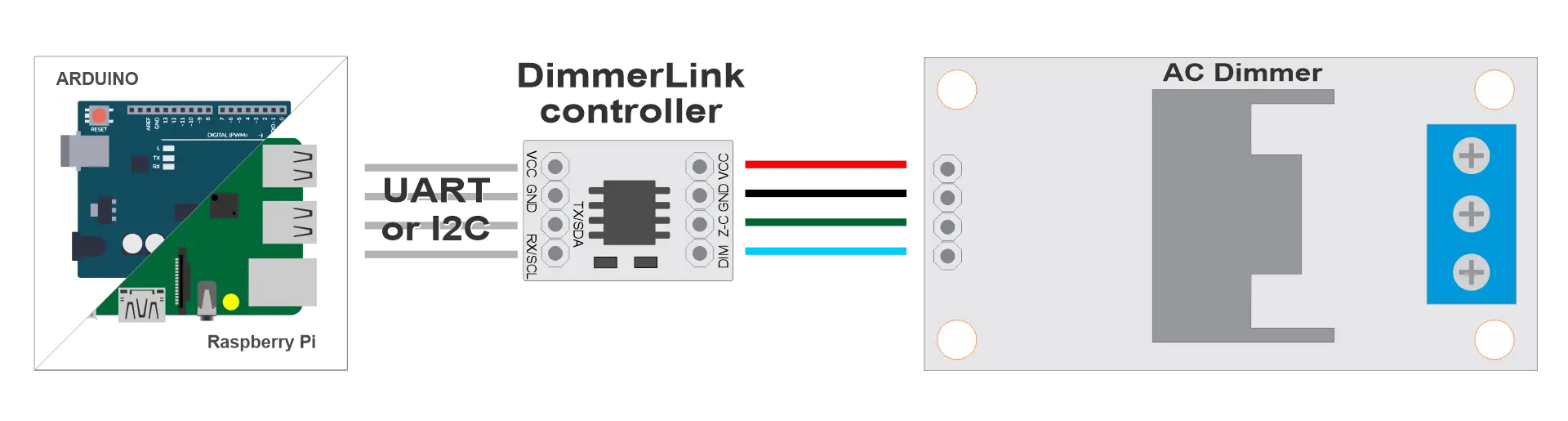
Working with DimmerLink is easy.
Key Features
✅ FLICKER-FREE — Dedicated Cortex-M+ handles all critical timings. No software delays, interrupt conflicts, or flickering.
✅ NO LIBRARIES REQUIRED — Send simple 3-4 byte commands via UART or I2C. Works with any programming language. Literally 5 lines of code.
✅ UNIVERSAL COMPATIBILITY — Arduino, ESP32, ESP8266, Raspberry Pi, STM32, any MCU with UART/I2C. Supports 1.8V, 3.3V, 5V logic levels.
✅ BRIGHTNESS CONTROL — 0-100% range
✅ DIMMING CURVES — Linear, RMS (for incandescent), Logarithmic. Auto-detection of 50/60Hz mains frequency.
✅ MAINS DETECTION — Automatic mains frequency detection (50/60 Hz)
✅ DUAL INTERFACE — UART (115200 8N1) or I2C. Switch by command at any time.
✅ ULTRA-COMPACT — Only 18×12mm. Standard 0.1" pins. Fits in any enclosure.
✅ PLUG & PLAY — Connect, power up, send command. Working dimmer in 5 minutes.
The Problem We Solve
Every maker knows this pain: you add an AC dimmer library to your project, and suddenly your lamps start flickering, timings go haywire, and you spend hours debugging interrupt conflicts. DimmerLink completely eliminates this problem by offloading all time-critical operations to a dedicated Cortex-M+ microcontroller.
How It Works
Connect DimmerLink between your controller (Arduino, ESP32, Raspberry Pi, or any MCU) and an AC dimmer module. Send a 3-byte command like SET 50% via UART or write a value to an I2C register. The controller handles zero-cross detection, calculates phase angle, and controls the TRIAC with microsecond precision. No libraries. No interrupts. No conflicts with your code.
Or connect to remote transmission modules like LoRa, GSM/GPRS, Bluetooth or WiFi bridges, or simply to your PC via USB-UART modules like CH340, CP2102/CP2104. Industrial RS-232 modules. No code required, just commands via terminal.
Which Interface to Choose?
| Criteria | UART | I2C |
|---|---|---|
| Connection simplicity | 2 wires + power | 2 wires + power |
| Speed | 115200 baud | 100 kHz |
| Multiple devices | No | Yes (different addresses) |
| Works with bridges | Yes (USB-UART, WiFi, LoRa) | Limited |
| Recommendation | For remote control | For local control |
💡 Tip: We recommend I2C for beginners — simpler code, clearer structure.
Compatibility
DimmerLink supports 1.8V, 3.3V and 5V logic levels — direct connection without level converters!
| Platform | UART | I2C | Logic Level |
|---|---|---|---|
| Arduino Uno/Nano | ✓ | ✓ | 5V ✓ |
| Arduino Mega | ✓ | ✓ | 5V ✓ |
| ESP8266 | ✓ | ✓ | 3.3V ✓ |
| ESP32 | ✓ | ✓ | 3.3V ✓ |
| STM32 (Blue Pill) | ✓ | ✓ | 3.3V ✓ |
| Raspberry Pi Pico | ✓ | ✓ | 3.3V ✓ |
| Raspberry Pi 3/4/5 | ✓ | ✓ | 3.3V ✓ |
| Orange Pi | ✓ | ✓ | 3.3V ✓ |
| Banana Pi | ✓ | ✓ | 3.3V ✓ |
| ATtiny, nRF52, MSP430 | ✓ | ✓ | 1.8V ✓ |
This is just a basic list — DimmerLink works with any microcontroller that has UART or I2C!
Quick Example
Arduino + I2C — set brightness to 50%:
#include
void setup() {
    Wire.begin();
    // Set brightness to 50%
    Wire.beginTransmission(0x50);
    Wire.write(0x10);  // Brightness register
    Wire.write(50);    // 50%
    Wire.endTransmission();
}
void loop() {}
Python + UART:
import serial
ser = serial.Serial('/dev/ttyUSB0', 115200)
ser.write(bytes([0x02, 0x53, 0x00, 50]))  # SET dimmer 0 to 50%
response = ser.read(1)
print("OK" if response[0] == 0 else "Error")
Serial Terminal Example:
1. Port → select your COM port
2. Baud: 115200
3. Send → "Send Numbers" tab
4. Enter: 02 53 00 32 or 0x02 0x53 0x00 0x32 (HEX 32 is 50 in decimal)
5. Click "Send Numbers"
Code Examples
Ready-to-use examples are located in the examples/ folder:
examples/
├── arduino/
│   ├── uart_basic.ino
│   └── i2c_basic.ino
├── python/
│   ├── uart_example.py
│   └── i2c_example.py
└── micropython/
    ├── uart_example.py
    └── i2c_example.py
Support
- GitHub Issues: Report an issue
- Product Page: DImmerLink on rbdimmer.com
- AliExpress Page: DImmerLink on AliExpress
Documentation Version: 1.0 Date: 2026-01